

[2022] Pass Microsoft PL-900 Exam Updated 187 Questions
Get 2022 Updated Free Microsoft PL-900 Exam Questions and Answer
NEW QUESTION 52
You need to explain the major components of the Common Data Model (CDM) and their functions.
Match each term to its definition.
Instructions: To answer, drag the appropriate term from the column on the left to its definition on the right.
Each term may be used once, more than once, or not at all. Each correct match is worth one point.
NOTE: Each correct selection is worth one point.
Answer:
Explanation: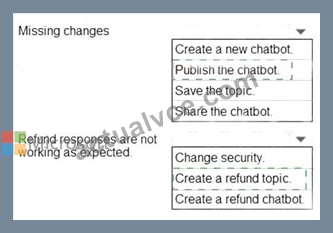
Explanation
NEW QUESTION 53
A business is evaluating AI Builder.
Which actions can you perform?
For each of the following statements, select Yes if the statement is true. Otherwise, select No.
NOTE: Each correct selection is worth one point.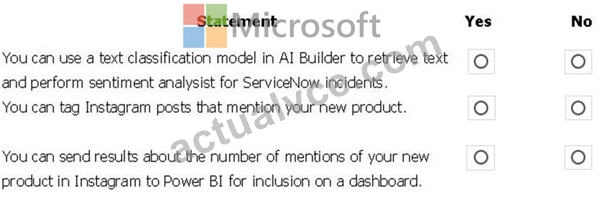
Answer:
Explanation: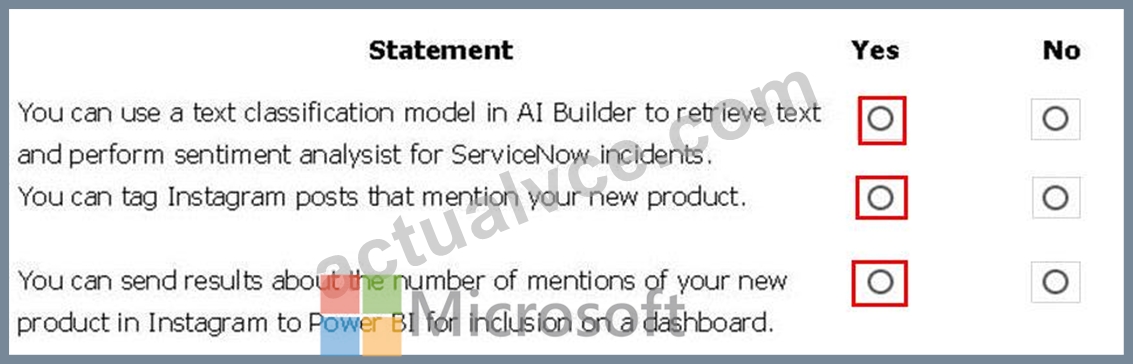
Reference:
https://docs.microsoft.com/en-us/ai-builder/create-text-classification-model
https://radacad.com/object-detector-app-with-ai-builder-and-power-apps
NEW QUESTION 54
A travel company plans to use the Power Platform to create tools that help travel agents book customer travel.
You need to recommend solutions for the company.
What should you recommend? To answer, drag the appropriate tools to the correct requirements. Each tool may be used once, more than once, or not at all. You may need to drag the split bar between panes or scroll to view content.
NOTE: Each correct selection is worth one point.
Answer:
Explanation: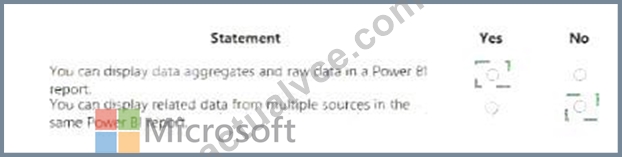
Explanation
Reference:
https://docs.microsoft.com/en-us/power-automate/getting-started
https://docs.microsoft.com/en-us/powerapps/maker/common-data-service/data-platform-create-business-rule#:~:
NEW QUESTION 55
You create a Power Bl dashboard.
Match each option to its requirement. To answer, drag the appropriate option from the column on the left to the correct requirement on the right. Each option may be used once, more than once, or not at all.
NOTE: Each correct match is worth one point.
Answer:
Explanation:
Explanation
NEW QUESTION 56
A company plans to implement solutions that use Common Data Service as a data storage.
You need to recommend features to meet the company's needs.
Which features should you recommend? To answer, drag the appropriate features to the correct requirements. Each feature may be used once, more than once, or not at all. You may need to drag the split bar between panes or scroll to view content.
NOTE: Each correct selection is worth one point.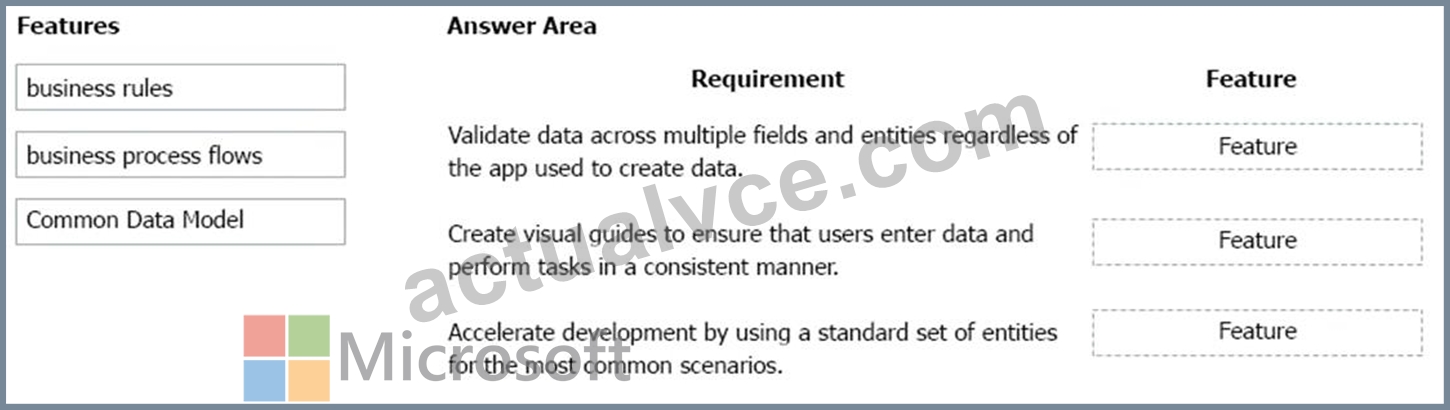
Answer:
Explanation: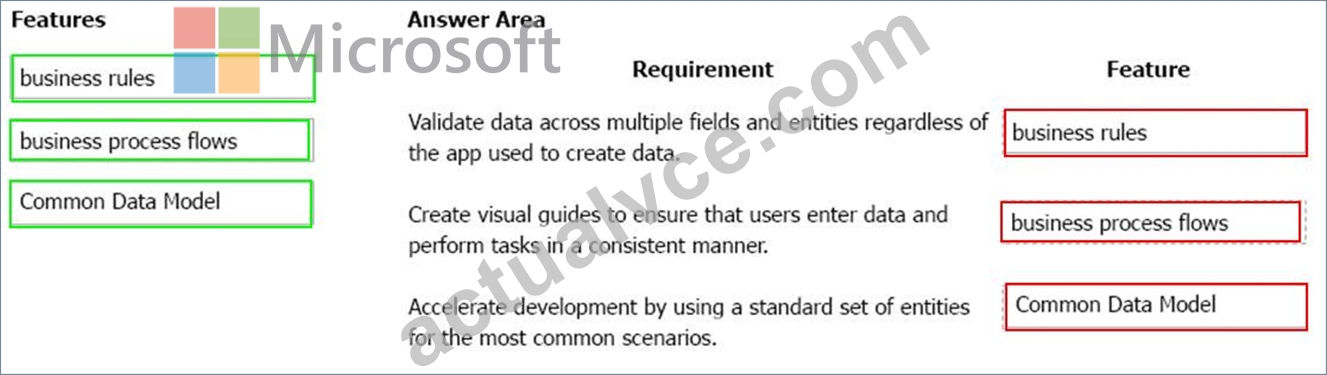
Reference:
https://docs.microsoft.com/en-us/powerapps/maker/model-driven-apps/guide-staff-through-common-tasks-processes
https://docs.microsoft.com/en-us/powerapps/maker/model-driven-apps/model-driven-app-overview
NEW QUESTION 57
You manage the support team at a rapidly growing company.
Customers and support technicians need a better experience when logging and responding to support requests.
You need more visibility into what the support technicians are doing every week.
You need to recommend tools to help the company's needs.
Which tools should you recommend? To answer, drag the appropriate tools to the correct requirements. Each tool may be used once, more than once, or not at all. You may need to drag the split bar between panes or scroll to view content.
NOTE: Each correct selection is worth one point.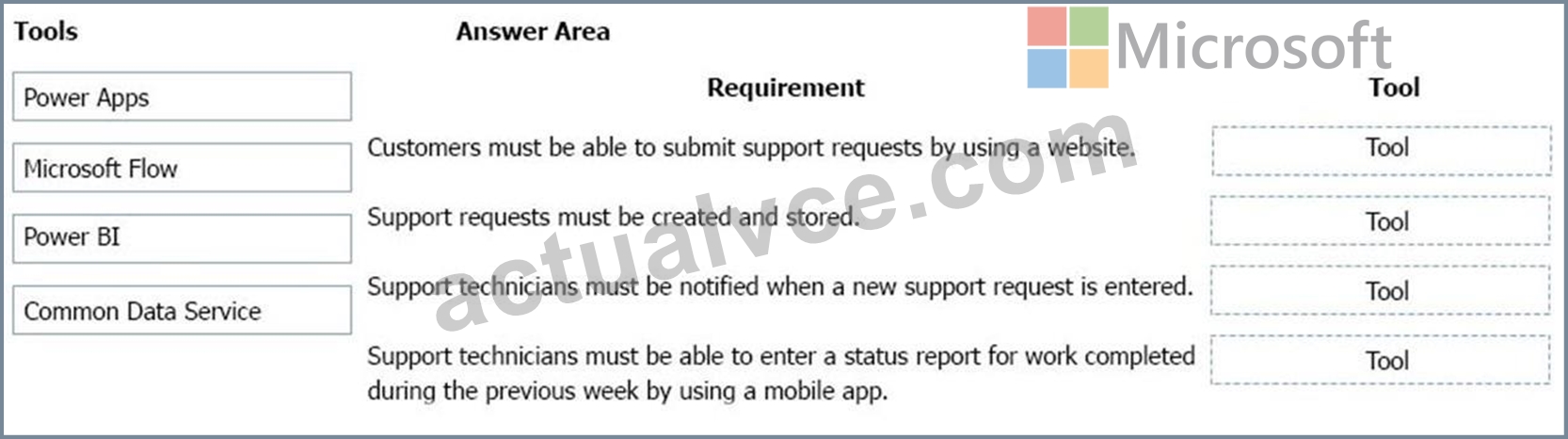
Answer:
Explanation:
Explanation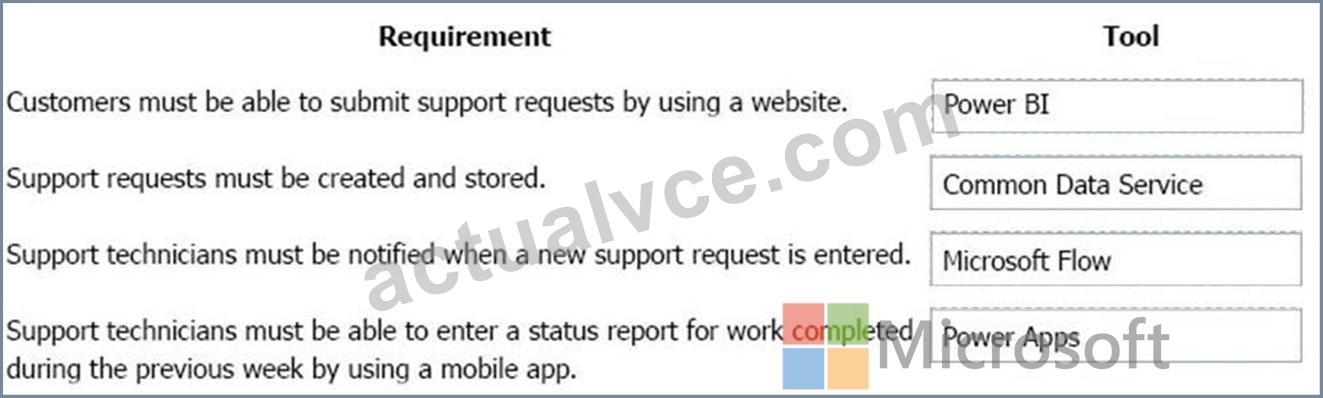
NEW QUESTION 58
You create a Power BI dashboard that displays data from Dynamics 365 Customer Engagement.
You need to share the Power BI dashboard with coworkers.
What are three possible ways to achieve the goal? Each correct answer presents a complete solution.
NOTE: Each correct selection is worth one point.
- A. Publish the dashboard as an app to your coworkers.
- B. Export the data to Microsoft Excel for coworkers to import and view in Power BI.
- C. Create a Power BI workspace and grant coworkers permissions.
- D. Export the data into Common Data Service for others to manipulate in Power BI.
- E. Embed reports in your company's internal web portal.
Answer: A,C,E
Explanation:
A: Basic Sharing for Dashboards and Reports through a workspace is the most common way of sharing the Power BI content. Basic Sharing is very simple and easy to use method. You can simply click on the Share button in the dashboard or report, and then share it with other users.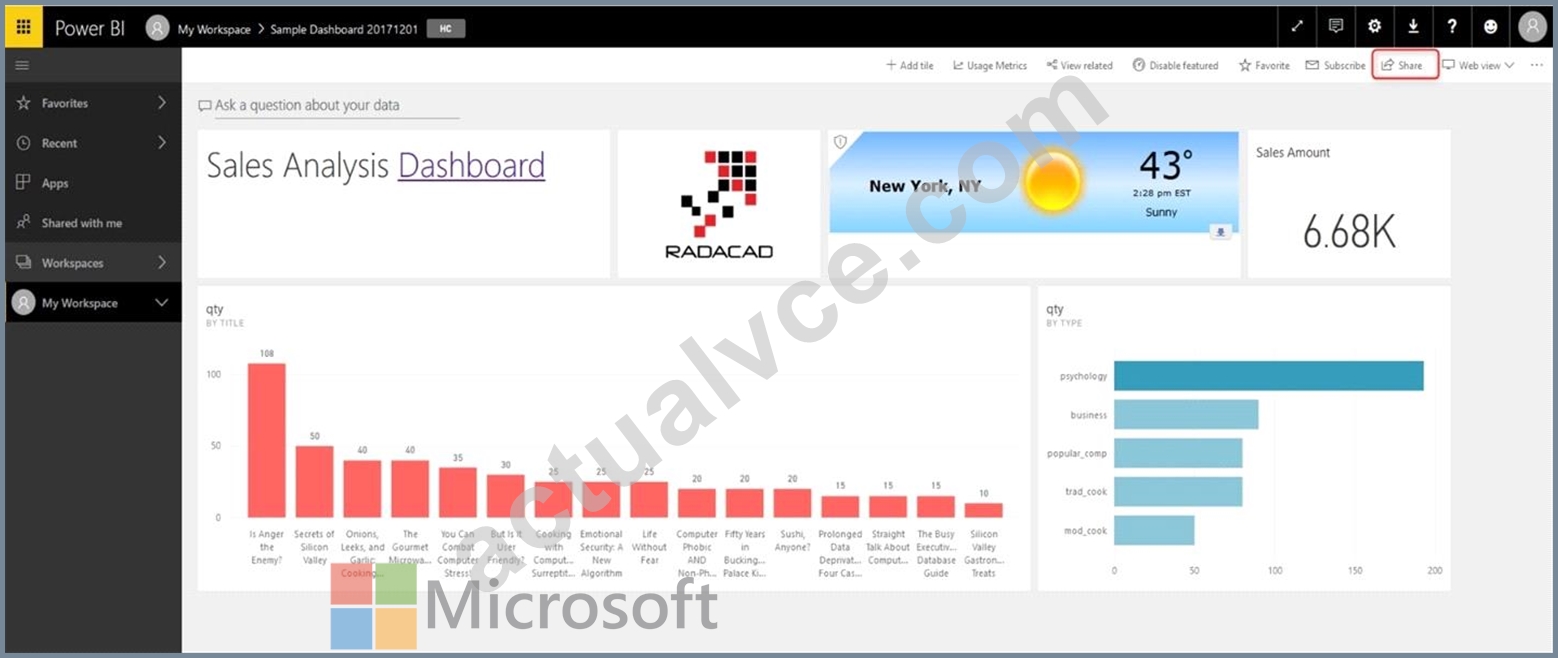
B: Apps are great sharing method for multiple environment, and best way of sharing for users in production environment.
Power BI App is the solution for multiple environment approach. With Power BI App, your development environment (workspace), and user environment (App) are isolated from each other.
Note: If you are using SharePoint online as a portal for document management and some other reasons already, then consider using Embed in SharePoint Online feature of Power BI reports. This method is secure and you can share the report only with Power BI users you want.
E: Sometimes, you don't need a secure way of sharing, you may search for an easy and free way of sharing, and your content is not confidential or sensitive. Publish to web is your friend in such situation. This is the only free way of sharing in Power BI, but be aware that this method is not secure.
Publish to web method, gives you an embed code, which you can use in any web pages to embed the Power BI report in it Reference:
https://radacad.com/power-bi-sharing-methods-comparison-all-in-one-review
NEW QUESTION 59
A company plans to build new apps for the business to allow employees to work more efficiently.
You need to recommend the appropriate types of Power Apps to meet the company's requirements.
To answer, drag the appropriate app types to the correct requirements. Each app type may be used once, more than once, or not at all. You may need to drag the split bar between panes or scroll to view content.
NOTE: Each correct selection is worth one point.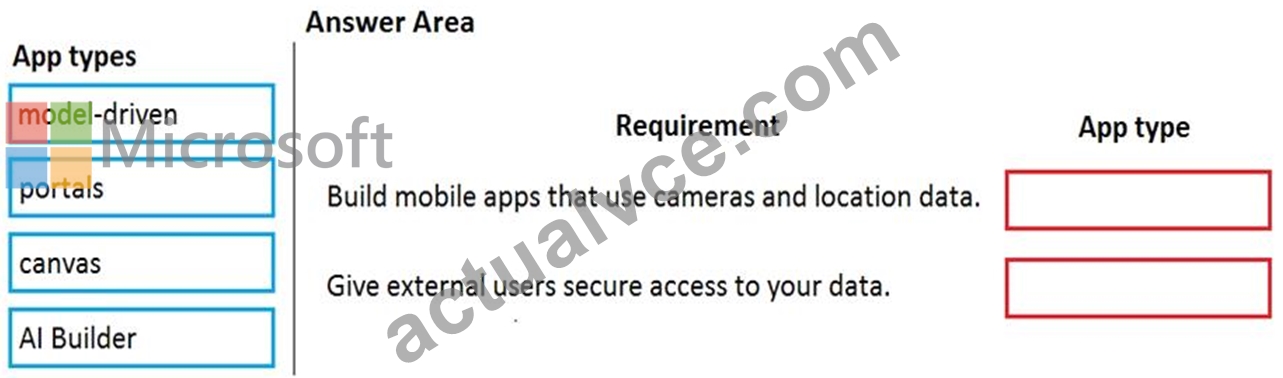
Answer:
Explanation: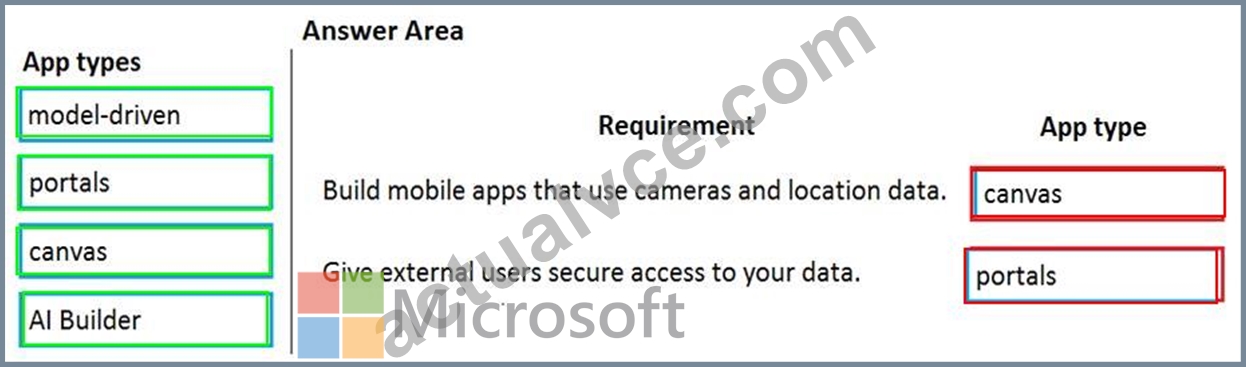
Reference:
https://docs.microsoft.com/en-us/powerapps/maker/canvas-apps/getting-started
https://docs.microsoft.com/en-us/powerapps/maker/portals/overview
NEW QUESTION 60
You are a district manager for a large retail company. You want to provide sales managers with deeper sales insights to ensure that they can make more informed decisions for their stores.
Store managers must be able to view data in near real-time.
You need to create and share a Power Bl dashboard that can be used by the store managers.
Which tools can you use? To answer, drag the appropriate reporting types to the correct requirements. Each reporting type may be used once, more than once, or not at all. You may need to drag the split bar between panes or scroll to view content.
Answer:
Explanation:
NEW QUESTION 61
You have a Power BI report.
For each of the following statements, select Yes if the statement is true. Otherwise, select No.
NOTE: Each correct selection is worth one point.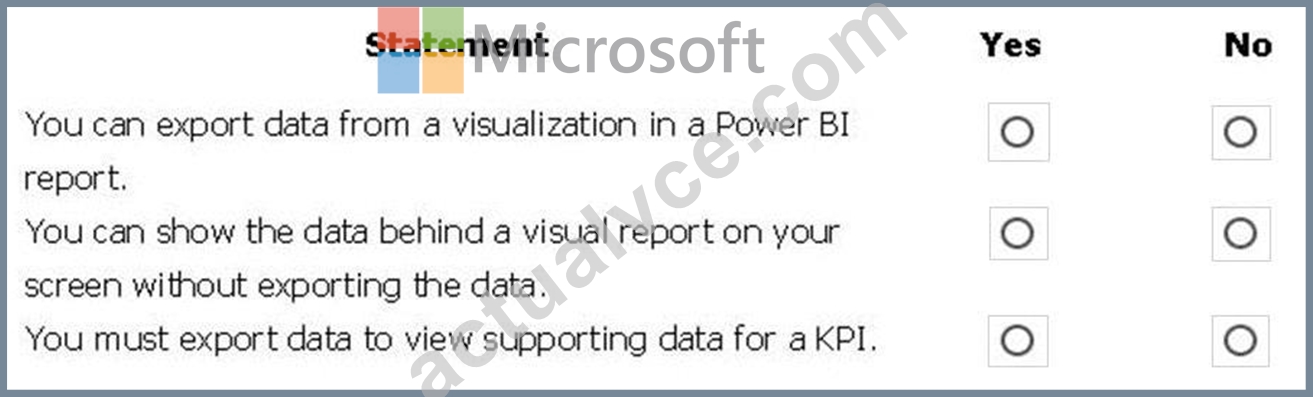
Answer:
Explanation: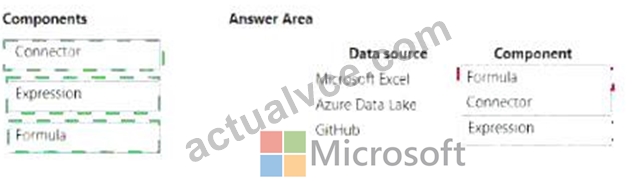
Explanation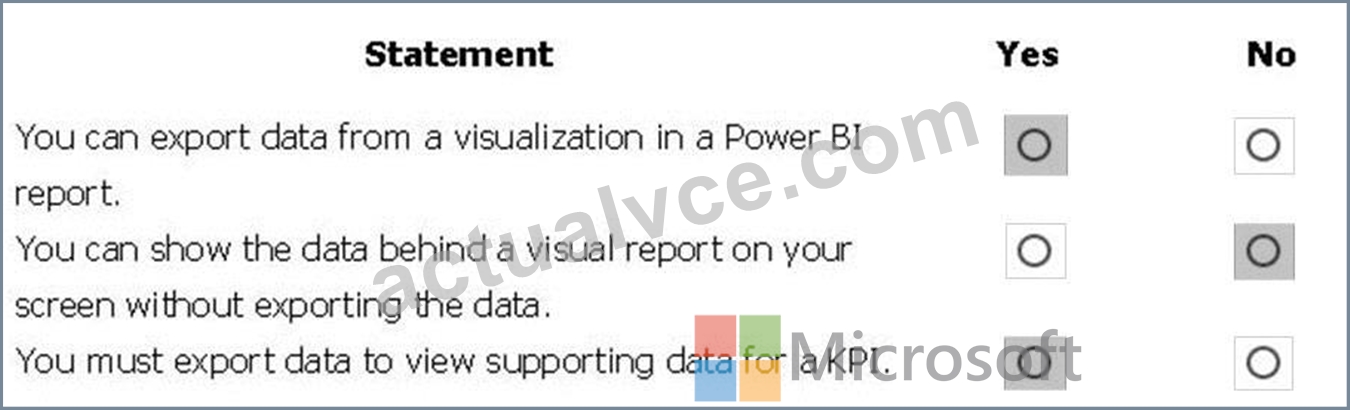
Box 1: Yes
If you'd like to see the data that Power BI uses to create a visualization, you can display that data in Power BI.
You can also export that data to Excel as an .xlsx or .csv file. The option to export the data requires a Pro or Premium license and edit permissions to the dataset and report.
Note: Export data from a Power BI dashboard
* Select the ellipsis in the upper-right corner of the visualization.
* Choose the Export data icon.
* Power BI exports the data to a .csv file. If you've filtered the visualization, then the app will filter the downloaded data.
* Your browser will prompt you to save the file. Once saved, open the .csv file in Excel.
Box 2: No
Underlying data: Select this option if you want to see the data in the visual and additional data from the model (see chart below for details). If your visualization has an aggregate, selecting Underlying data removes the aggregate. When you select Export, Power BI exports the data to an .xlsx file and your browser prompts you to save the file. Once saved, open the file in Excel.
Box 3: Yes
A KPI dataset needs to contain goal values for a KPI. If your dataset doesn't contain goal values, you can create them by adding an Excel sheet with goals to your data model or PBIX file.
Note: A Key Performance Indicator (KPI) is a visual cue that communicates the amount of progress made toward a measurable goal.
Reference:
https://docs.microsoft.com/en-us/power-bi/visuals/power-bi-visualization-export-data
https://docs.microsoft.com/en-us/power-bi/visuals/power-bi-visualization-kpi
NEW QUESTION 62
For each of the following statements, select Yes if the statement is true, Otherwise, select No.
NOTE: Each correct selection is worth one point.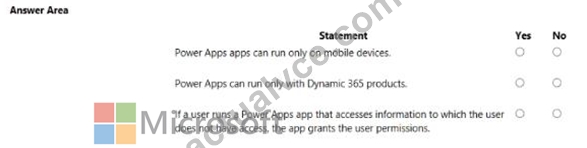
Answer:
Explanation: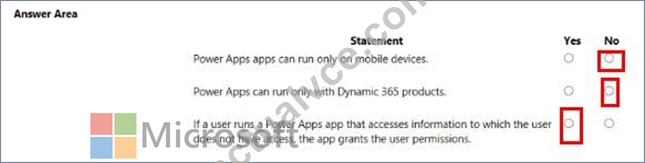
NEW QUESTION 63
A company plans to create a Common Data Service environment.
For each of the following statements, select Yes if the statement is true. Otherwise, select No.
NOTE: Each correct selection is worth one point.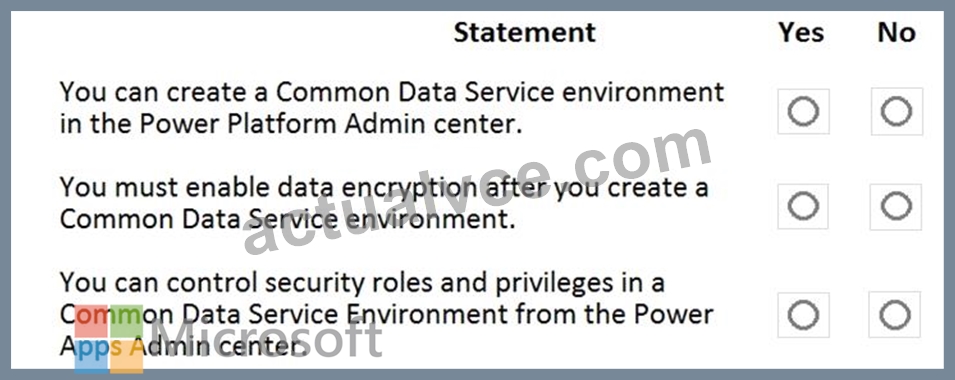
Answer:
Explanation: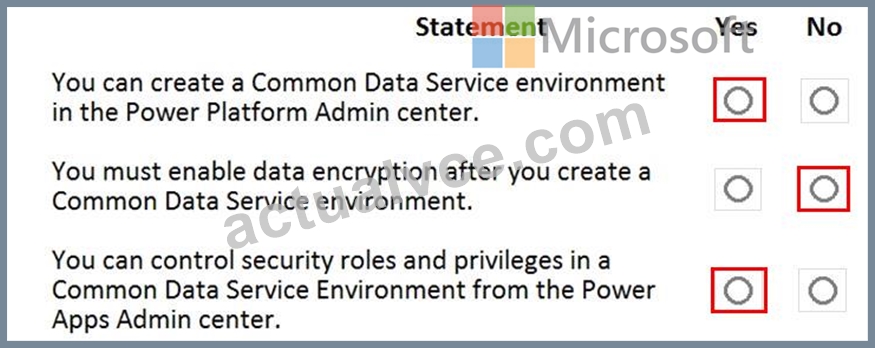
Reference:
https://docs.microsoft.com/en-us/power-platform/admin/create-database
https://docs.microsoft.com/en-us/power-platform/admin/database-security
NEW QUESTION 64
You are planning to use the Business Card Reader and Sentiment Analysis prebuilt AI models to build solutions.
For each of the following statements, select Yes if the statement is true. Otherwise, select No.
NOTE: Each correct selection is worth one point.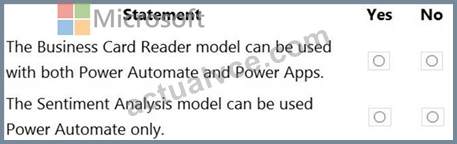
Answer:
Explanation:
Explanation
Graphical user interface, text Description automatically generated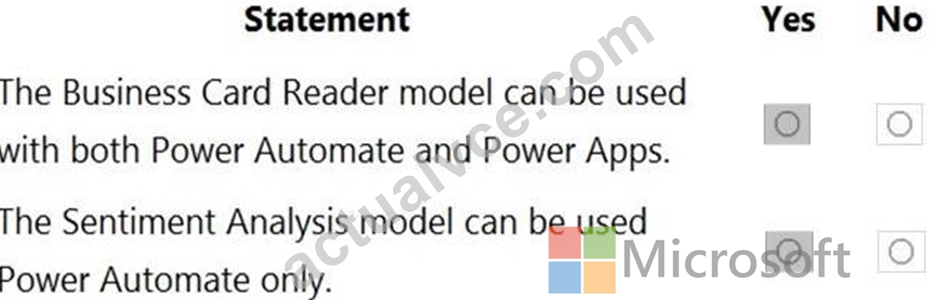
Reference:
https://docs.microsoft.com/en-us/ai-builder/business-card-reader-component-model-driven
https://docs.microsoft.com/en-us/ai-builder/flow-business-card-reader
https://docs.microsoft.com/en-us/ai-builder/flow-sentiment-analysis
NEW QUESTION 65
You manage the support team at a rapidly growing company.
Customers and support technicians need a better experience when logging and responding to support requests. You need more visibility into what the support technicians are doing every week.
You need to recommend tools to help the company's needs.
Which tools should you recommend? To answer, drag the appropriate tools to the correct requirements. Each tool may be used once, more than once, or not at all. You may need to drag the split bar between panes or scroll to view content.
NOTE: Each correct selection is worth one point.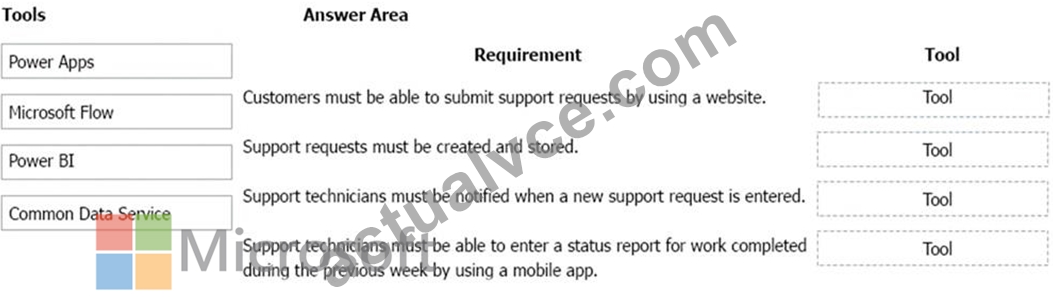
Answer:
Explanation: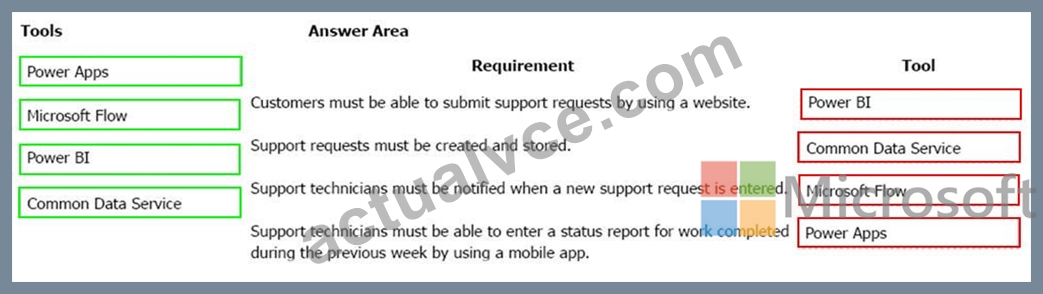
NEW QUESTION 66
You use Microsoft Flow to create a flow that automatically sends email to a project manager when project team members mark a task as complete.
Project team members are prematurely marking tasks as complete. You must add quality control into the process by sending an email to a project lead for confirmation that the task is in fact complete before sending the email to the project manager.
You need to modify the flow.
Which component should you use?
- A. a process argument
- B. an action
- C. a trigger
- D. an expression
- E. a condition
Answer: E
Explanation:
Section: Demonstrate the business value of Microsoft Flow
Explanation:
Use a condition and set the action to send an email.
Reference:
https://docs.microsoft.com/en-us/power-automate/add-condition
NEW QUESTION 67
A company uses a third party application and an approval process via email. At the end of the month, the IT department enters the data into Microsoft Excel to create pivot charts.
The Excel pivot charts must use the same data source as Dynamics 365 Field Service to generate charts and reports.
You need to recommend a solution.
What should you recommend? To answer, select the appropriate configuration in the answer area.
NOTE: Each correct selection is worth one point.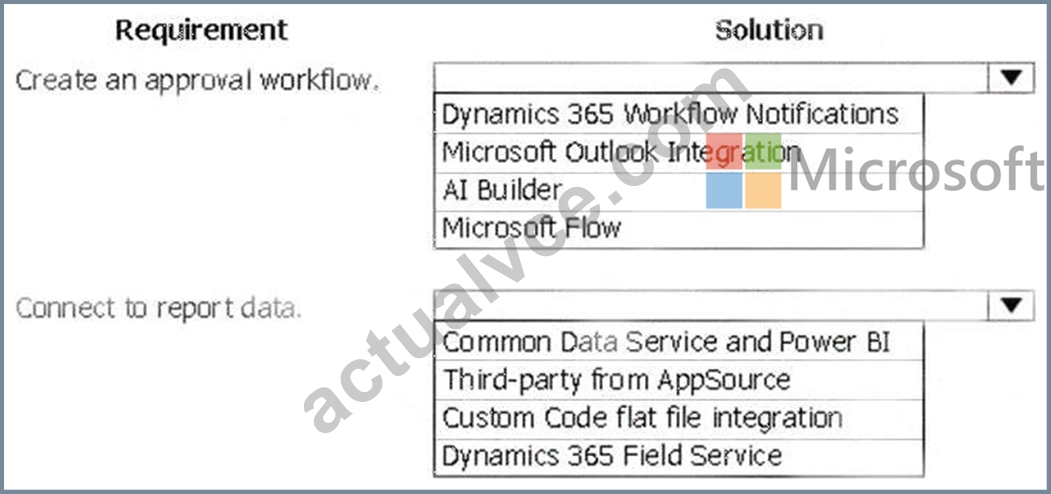
Answer:
Explanation: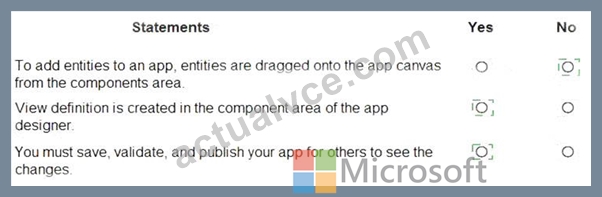
Explanation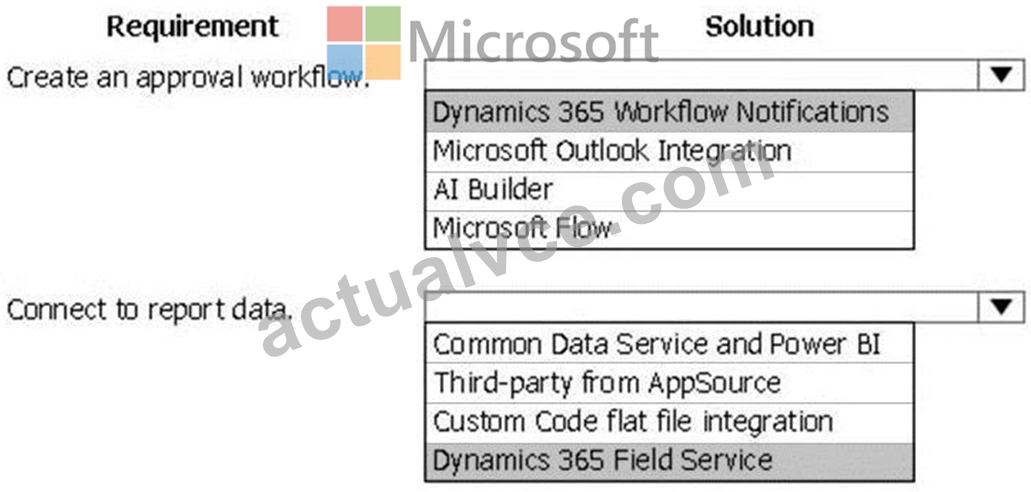
Box 1: Dynamics 365 Workflow notifications
You can configure the system to send email messages to users when workflow-related events occur.
Note:
* Go to Navigation pane > Modules > System administration > Users > Users.
* In the list, find and select the desired record.
* On the Action pane, click User options.
* Click the Workflow tab. Make sure that the Notifications section is expanded. In the Notifications section, you can specify how you want the user to be notified about workflow-related events.
Box 2: Dynamics 365 Field Service
Supply Chain Management enables synchronization of business processes between Dynamics 365 Supply Chain Management and Dynamics 365 Field Service. The integration scenarios are configured by using extensible Data integrator templates and Common Data Service to enable the synchronization of business processes. Standard templates can be used to create custom integration projects, where additional standard and custom fields and entities can be mapped to adjust the integration and meet specific business needs.
Reference:
https://docs.microsoft.com/en-us/dynamics365/fin-ops-core/fin-ops/organization-administration/tasks/users-recei
NEW QUESTION 68
You create a Power BI dashboard that displays Common Data Model data.
You need to share the Power BI dashboard with coworkers and allow the coworkers to collaborate.
What are two possible ways to achieve the goal? Each correct answer presents a complete solution.
NOTE: Each correct selection is worth one point.
- A. Export the data to Microsoft Excel. Make required changes and then re-import the data.
- B. Publish the dashboard as an app to your coworkers.
- C. Create a Power Automate flow to export the data into a SQL Server database.
- D. Create a Power BI workspace and grant coworkers permissions.
Answer: B,D
Explanation:
Section: Demonstrate the capabilities of Power BI
Explanation/Reference:
https://docs.microsoft.com/en-us/power-bi/collaborate-share/service-create-the-new-workspaces
NEW QUESTION 69
You need to explain the major components of the Common Data Model (CDM) and their functions.
Match each term to its definition.
Instructions: To answer, drag the appropriate term from the column on the left to its definition on the right. Each term may be used once, more than once, or not at all. Each correct match is worth one point.
NOTE: Each correct selection is worth one point.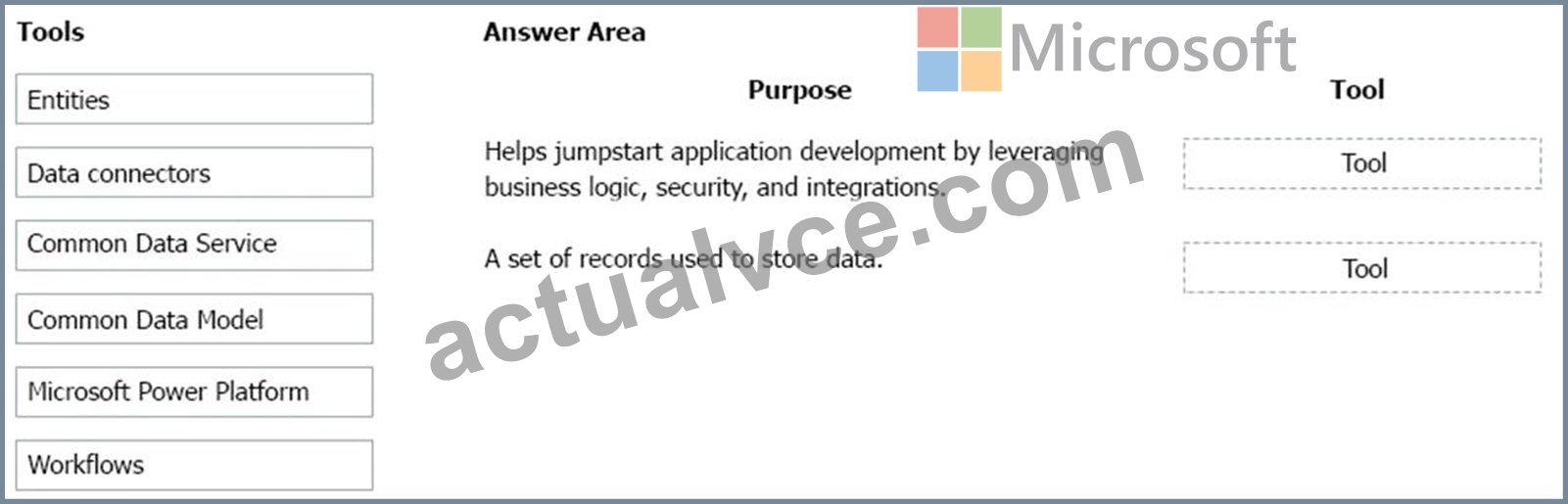
Answer:
Explanation: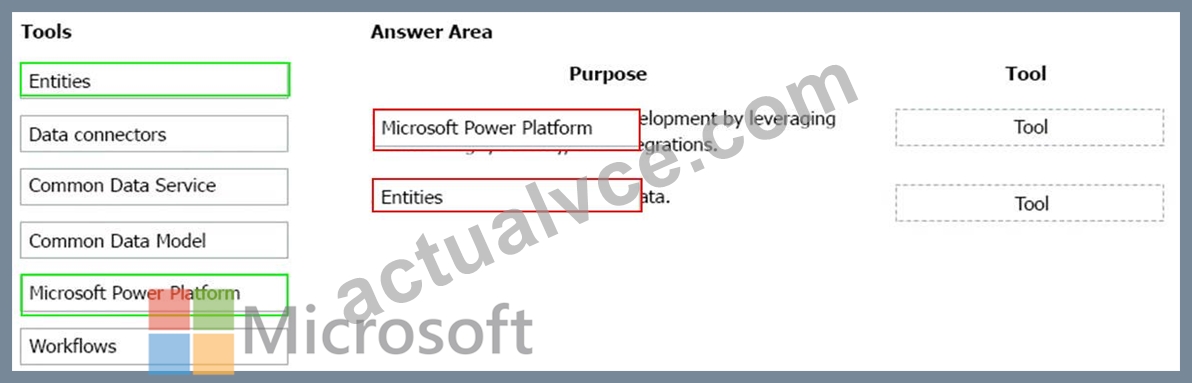
Explanation:
Box 1: Microsoft Power Platform
Power Platform combines the robust power of PowerApps, PowerBI, and Microsoft Flow into one powerful business application platform - providing quick and easy app building and data insights. Each component of the Microsoft Power Platform is built on the Common Data Service for Apps. Each component is dynamic by itself, but brilliant and masterful when combined.
The Microsoft Power platform brings all your data together into a common data model.
Box 2: Entities
An entity is a set of records used to store data, similar to how a table stores data within a database.
Reference:
https://community.dynamics.com/365/b/encloud9dynamicss365crm/posts/an-introduction-to-the-microsoft-power-platform
https://docs.microsoft.com/en-us/powerapps/maker/common-data-service/data-platform-intro
NEW QUESTION 70
A company plans to implement solutions that use Common Data Service as a data storage.
You need to recommend features to meet the company's needs.
Which features should you recommend? To answer, drag the appropriate features to the correct requirements. Each feature may be used once, more than once, or not at all. You may need to drag the split bar between panes or scroll to view content.
NOTE: Each correct selection is worth one point.
Answer:
Explanation: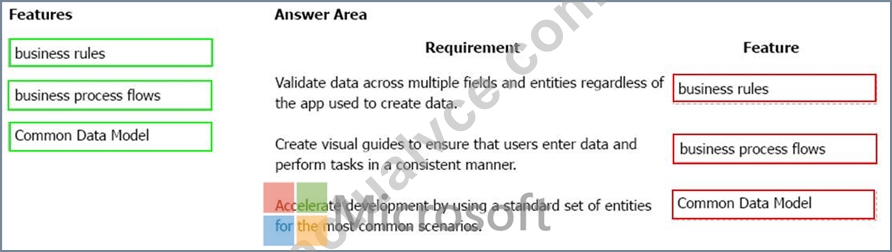
Explanation:
Box 1: business rules
You can create business rules and recommendations to apply logic and validations without writing code or creating plug-ins. Business rules provide a simple interface to implement and maintain fast-changing and commonly used rules.
Box 2: business process flows
Flows Power Automate includes several types of processes, each designed for a different purpose:
* Automated flows. Create a flow that performs one or more tasks automatically after it's triggered by an event.
* Button flows. Perform repetitive tasks simply by tapping a button on your mobile device.
* Scheduled flows. Create a flow that performs one or more tasks on a schedule such as once a day, on a specific date, or after a certain time.
* Business process flows. Ensure that people enter data consistently and follow the same steps every time they work in an app by creating a business process flow.
* Workflows and actions. Dynamics 365 customizers may be familiar with the classic Common Data Service processes, which are workflows and actions.
Box 3: Common Data Model
Model-driven app design is a component-focused approach to app development. Model-driven app design doesn't require code and the apps you make can be simple or very complex. Unlike canvas app development where the designer has complete control over app layout, with model-driven apps much of the layout is determined for you and largely designated by the components you add to the app.
Reference:
https://docs.microsoft.com/en-us/powerapps/maker/model-driven-apps/guide-staff-through-common-tasks-processes
https://docs.microsoft.com/en-us/powerapps/maker/model-driven-apps/model-driven-app-overview
NEW QUESTION 71
......
Verified PL-900 exam dumps Q&As with Correct 187 Questions and Answers: https://www.actualvce.com/Microsoft/PL-900-valid-vce-dumps.html
PL-900 Dumps PDF and Test Engine Exam Questions: https://drive.google.com/open?id=1UTo95pEH3zGlPZYlEzxHemW7JDwDexwj