

COF-C02 Premium PDF & Test Engine Files with 975 Questions & Answers
Get 100% Real COF-C02 Exam Questions, Accurate & Verified Answers As Seen in the Real Exam!
NEW QUESTION # 505
Which of the following commands cannot be used within a reader account?
- A. ALTER WAREHOUSE
- B. CREATE SHARE
- C. DROP ROLE
- D. DESCRBE TABLE
- E. SHOW SCHEMAS
Answer: B
Explanation:
In Snowflake, a reader account is a type of account that is intended for consuming shared data rather than performing any data management or DDL operations. The CREATE SHARE command is used to share data from your account with another account, which is not a capability provided to reader accounts. Reader accounts are typically restricted from creating shares, as their primary purpose is to read shared data rather than to share it themselves.
References:
* Snowflake Documentation on Reader Accounts
* SnowPro Core Certification Study Guide
NEW QUESTION # 506
Why does Snowflake recommend file sizes of 100-250 MB compressed when loading data?
- A. Allows a user to import the files in a sequential order
- B. Allows optimization of parallel operations
- C. Increases the latency staging and accuracy when loading the data
- D. Optimizes the virtual warehouse size and multi-cluster setting to economy mode
Answer: B
NEW QUESTION # 507
What happens when a database is cloned?
- A. It replicates all granted privileges on the corresponding source objects.
- B. It replicates all granted privileges on the corresponding child objects.
- C. It replicates all granted privileges on the corresponding child schema objects.
- D. It does not retain any privileges granted on the source object.
Answer: B
NEW QUESTION # 508
Which of the following are best practice recommendations that should be considered when loading data into Snowflake? (Select TWO).
- A. Load files that are approximately 25 MB or smaller.
- B. Remove semi-structured data types
- C. Avoid using embedded characters such as commas for numeric data types
- D. Remove all dates and timestamps.
- E. Load files that are approximately 100-250 MB (or larger)
Answer: C,E
Explanation:
When loading data into Snowflake, it is recommended to:
C . Load files that are approximately 100-250 MB (or larger): This size is optimal for parallel processing and can help to maximize throughput. Smaller files can lead to overhead that outweighs the actual data processing time.
D . Avoid using embedded characters such as commas for numeric data types: Embedded characters can cause issues during data loading as they may be interpreted incorrectly. It's best to clean the data of such characters to ensure accurate and efficient data loading.
These best practices are designed to optimize the data loading process, ensuring that data is loaded quickly and accurately into Snowflake.
Reference:
Snowflake Documentation on Data Loading Considerations
[COF-C02] SnowPro Core Certification Exam Study Guide
NEW QUESTION # 509
Which of the following are benefits of micro-partitioning? (Select TWO)
- A. Micro-partitions cannot overlap in their range of values
- B. Rows are automatically stored in sorted order within micro-partitions
- C. Micro-partitions can reduce the amount of I/O from object storage to virtual warehouses
- D. Micro-partitions can be defined on a schema-by-schema basis
- E. Micro-partitions are immutable objects that support the use of Time Travel.
Answer: C,E
Explanation:
Micro-partitions in Snowflake are immutable objects, which means once they are written, they cannot be modified. This immutability supports the use of Time Travel, allowing users to access historical data within a defined period. Additionally, micro-partitions can significantly reduce the amount of I/O from object storage to virtual warehouses. This is because Snowflake's query optimizer can skip over micro-partitions that do not contain relevant data for a query, thus reducing the amount of data that needs to be scanned and transferred.
References: [COF-C02] SnowPro Core Certification Exam Study Guide
https://docs.snowflake.com/en/user-guide/tables-clustering-micropartitions.html
NEW QUESTION # 510
What action is required to load data from a local file system into a Snowflake table?
- A. Upload data files to a Snowflake internal stage using the PUT command and then use the COPY INTO
<table> command. - B. Use the COPY INTO <table> command directly on the local file system.
- C. Upload data files to a Snowflake external stage using the COPY INTO <table> and then use the GET command.
- D. Use the PUT command directly on the local file system.
Answer: A
Explanation:
To load local files into Snowflake:
* First, use the PUT command to upload files from local storage to an internal stage.
* Then, use the COPY INTO <table> command to load data from the internal stage into the table.
Reference:
Snowflake Docs: Loading Data from Local Files
NEW QUESTION # 511
Which of the following Snowflake capabilities are available in all Snowflake editions? (Select TWO)
- A. Object-level access control
- B. Automatic encryption of all data
- C. Column-level security to apply data masking policies to tables and views
- D. Customer-managed encryption keys through Tri-Secret Secure
- E. Up to 90 days of data recovery through Time Travel
Answer: A,B
NEW QUESTION # 512
What is the outcome of querying a VARIANT column using an invalid path?
- A. NULL
- B. An invalid identifier error
- C. Undefined data
- D. An empty siring
Answer: B
NEW QUESTION # 513
Which of the following objects can be directly restored using the UNDROP command? (Choose two.)
- A. View
- B. Schema
- C. Role
- D. Table
- E. Internal stage
- F. User
Answer: A,D
Explanation:
The UNDROP command in Snowflake can be used to directly restore Views and Tables. These objects, when dropped, are moved to a 'Recycle Bin' where they can be restored within a time limit before they are permanently deleted. Reference: [COF-C02] SnowPro Core Certification Exam Study Guide
NEW QUESTION # 514
How are network policies defined in Snowflake?
- A. They are a set of rules that dictate how Snowflake accounts can be used between multiple users.
- B. They are a set of rules that control access to Snowflake accounts by specifying the IP addresses or ranges of IP addresses that are allowed to connect
- C. They are a set of rules that define how data can be transferred between different Snowflake accounts within an organization.
- D. They are a set of rules that define the network routes within Snowflake.
Answer: B
Explanation:
to Snowflake.
Explanation:
Network policies in Snowflake are defined as a set of rules that manage the network-level access to Snowflake accounts. These rules specify which IP addresses or IP ranges are permitted to connect to Snowflake, enhancing the security of Snowflake accounts by preventing unauthorized access. Network policies are an essential aspect of Snowflake's security model, allowing administrators to enforce access controls based on network locations.
Reference:
Snowflake Documentation: Network Policies
NEW QUESTION # 515
Which Snowflake objects can be defined with future grants? (Select TWO).
- A. Databases
- B. External functions
- C. Masking policies
- D. Virtual warehouses
- E. Schemas
Answer: A,E
Explanation:
* Future grants allow privileges to be automatically applied to new objects (e.g., schemas, tables, databases) created in the future.
* Supported objects for future grants include:
* Databases: Future grants apply to new schemas or tables created within a database.
* Schemas: Future grants apply to new tables, views, or other objects created within a schema.
Why Other Options Are Incorrect:
* C. Masking policies / D. External functions / E. Virtual warehouses: These objects are not supported for future grants.
References:
* Future Grants Documentation
NEW QUESTION # 516
Which command can be used to stage local files from which Snowflake interface?
- A. Snowsight
- B. SnowSQL
- C. .NET driver
- D. Snowflake classic web interface (Ul)
Answer: B
Explanation:
SnowSQL is the command-line client for Snowflake that allows users to execute SQL queries and perform all DDL and DML operations, including staging files for bulk data loading. It is specifically designed for scripting and automating tasks.
References:
* SnowPro Core Certification Exam Study Guide
* Snowflake Documentation on SnowSQL
https://docs.snowflake.com/en/user-guide/snowsql-use.html
NEW QUESTION # 517 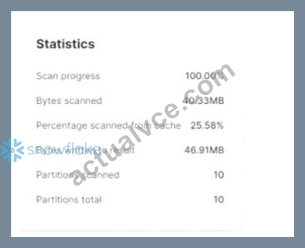
What do these Query Profile metrics indicate about the query micro-partition pruning?
- A. No micro-partitions were pruned during execution.
- B. Since the bytes scanned is less than the bytes written to results, some pruning has occurred.
- C. The size of the data queried was too small to trigger micro-partition pruning.
- D. The query used the local disk cache and pruning was not required.
Answer: A
Explanation:
* Micro-partition pruning is a Snowflake optimization feature that minimizes the amount of data scanned by restricting the query to relevant micro-partitions.
* Query Profile Analysis:
* The "Partitions scanned" and "Partitions total" metrics are both 10, indicating all partitions were scanned, and no pruning occurred.
* If micro-partition pruning had been applied, the number of partitions scanned would be fewer than the total partitions.
Key Observations from the Metrics:
* Bytes Scanned vs. Partitions:
* Since all partitions were scanned, pruning was not applied.
* Percentage Scanned from Cache (25.58%):
* Indicates that some data was retrieved from Snowflake's local cache, which helps reduce scan times. However, this does not relate to pruning.
* Bytes Scanned vs. Bytes Written:
* Even though the bytes scanned (40.33MB) is slightly less than the bytes written (46.91MB), this is not indicative of pruning but rather due to caching or result formatting.
References:
* Snowflake Documentation: Query Profile Overview
* Snowflake Documentation: Micro-Partition Pruning
NEW QUESTION # 518
If a JOIN operation is based on two columns which both contain NULL values, what SQL function will return results?
- A. An equal_null function
- B. A NULLIF function
- C. An I FNULL function used to change the NULL values to another value
- D. An NVL function used to change the NULL values to another value
Answer: D
Explanation:
* In SQL, NULL values are not equal to other NULL values. To make comparisons work in join operations, the NVL function can replace NULL with a non-NULL value.
* Example:
SELECT *
FROM table1 t1
JOIN table2 t2
ON NVL(t1.col, 'default') = NVL(t2.col, 'default');
Why Other Options Are Incorrect:
* B. Equal_null function: No such function exists in Snowflake SQL.
* C. NULLIF function: Used to return NULL when two values are equal, not for handling NULL in joins.
* D. IFNULL function: Similar to NVL but less commonly used in this context.
References:
* NVL Function Documentation
NEW QUESTION # 519
What is the following SQL command used for?
Select * from table(validate(t1, job_id => '_last'));
- A. To validate a file for errors before it gets executed using a COPY command
- B. To return errors from the last executed COPY command into table t1 in the current session
- C. To validate external table files in table t1 across all sessions
- D. To validate task SQL statements against table t1 in the last 14 days
Answer: B
Explanation:
The SQL command Select * from table(validate(t1, job_id => '_last')); is used to return errors from the last executed COPY command into table t1 in the current session. It checks the results of the most recent data load operation and provides details on any errors that occurred during that process1.
NEW QUESTION # 520
......
COF-C02 Premium Files Practice Valid Exam Dumps Question: https://www.actualvce.com/Snowflake/COF-C02-valid-vce-dumps.html
Practice with COF-C02 Dumps for SnowPro Core Certified Exam Questions & Answer: https://drive.google.com/open?id=16kC7gPh51SoTDnDXgOGkRPYLLqGRVcMF