

[Nov-2021] Dumps Practice Exam Questions Study Guide for the Associate-Android-Developer Exam
Associate-Android-Developer Dumps with Practice Exam Questions Answers
Exam Topics
Before attempting the certification exam, the candidates must develop competence in solving the coding challenges that are covered in it. The content of the test is briefly outlined below:
App Functionality: Within this subject area, the examinees should possess the capacity to construct apps that utilize media services, messaging, connectivity, and multitasking of Android to design and develop the full-featured applications working primarily on mobile devices.
User Interface: This domain requires competence in quickly creating applications with effective and clean user interfaces that can benefit from the rich UI frameworks of Android.
Debugging: The applicants should have an understanding of the debugging tools within the domain of Android Studio. They also need to be able to design and create more robust and reliable apps.
Data Management: The test takers should demonstrate their skills in leveraging the effective techniques and frameworks of Android to schedule or effectively carry out data storage or retrieval within a mobile environment.
Testing: The examinees need to have the skills required to evaluate the operation of running programs to discover errors and unexpected or abnormal behavior.
User interface
- Understanding how to use content descriptions to make views more available.
- Building a UI with a ConstraintLayout,
- Creating an Activity that shows the Layout
- Understanding how to use menu-based and drawer navigation.
- Adding accessibility hooks to a custom View.
- Knowing how to show items in a RecyclerView by the Paging library and binding local data.
- Describing how to build a custom View class and include it in a Layout.
- Describing the Android operation lifecycle.
- Knowing how to make a custom app theme.
NEW QUESTION 74
To create a basic JUnit 4 test class, create a class that contains one or more test methods. A test method begins with the specific annotation and contains the code to exercise and verify a single functionality in the component that you want to test. What is the annotation?
- A. @Rule
- B. @LargeTest
- C. @RunWith
- D. @Test
Answer: D
NEW QUESTION 75
In a common Paging Library architecture scheme, move instances to the correct positions.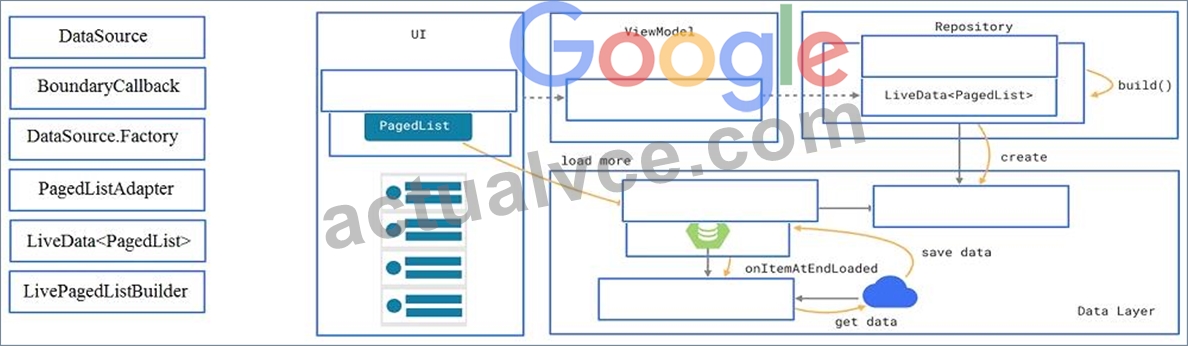
Answer:
Explanation: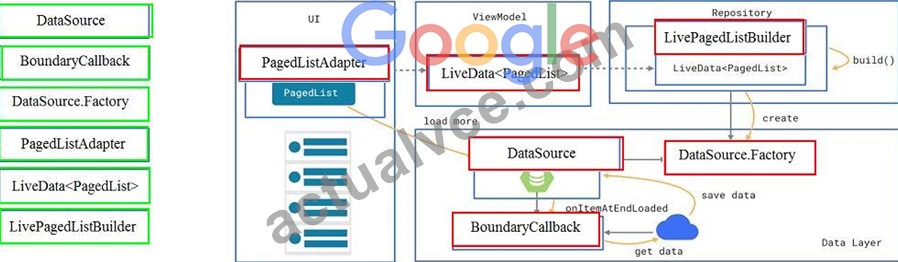
Reference:
https://developer.android.com/topic/libraries/architecture/paging/ui
NEW QUESTION 76
About running a debuggable build variant. Usually, you can just select the default "debug" variant that's included in every Android Studio project (even though it's not visible in the build.gradle file). But if you define new build types that should be debuggable, you must add 'debuggable true' to the build type. Is that mostly true?
- A. Yes.
- B. No, if you define new build types that should be debuggable, you must add 'debuggable false'
- C. No, the debug variant should be visible in the build.gradle file anyway.
Answer: A
NEW QUESTION 77
When using an ImageView, ImageButton, CheckBox, or other View that conveys information graphically. What attribute to use to provide a content label for that View?
- A. android:hint
- B. android:contentDescription
- C. android:labelFor
Answer: B
Explanation:
Reference:
https://support.google.com/accessibility/android/answer/7158690?hl=en
NEW QUESTION 78
In application theme style, flag windowNoTitle (<item name="windowNoTitle">) indicates:
- A. whether this is a floating window.
- B. whether this Window is responsible for drawing the background for the system bars.
- C. whether this window should have an Action Bar in place of the usual title bar.
- D. whether there should be no title on this window.
- E. that this window should not be displayed at all.
Answer: D
Explanation:
Reference:
https://developer.android.com/guide/topics/ui/look-and-feel/themes https://developer.android.com/reference/android/R.styleable.html
NEW QUESTION 79
Under the hood WorkManager uses an underlying job dispatching service based on the following criteri a. You need to move services to the correct places.
Answer:
Explanation: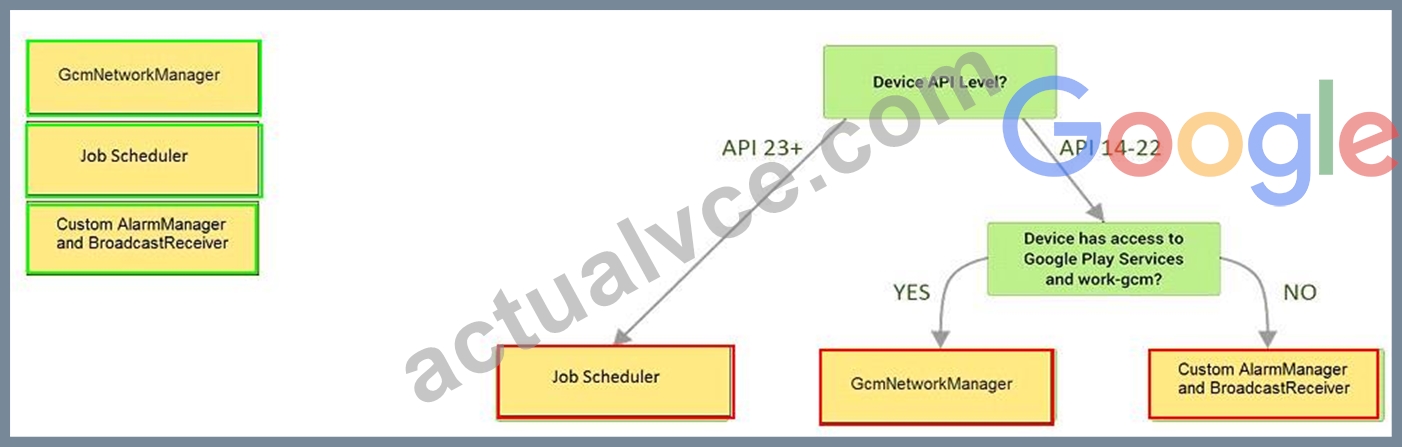
Explanation:
Videos:
Working with WorkManager, from the 2018 Android Dev Summit
WorkManager: Beyond the basics, from the 2019 Android Dev Summit
Reference:
https://developer.android.com/reference/androidx/work/WorkManager?hl=en
NEW QUESTION 80
In a class PreferenceFragmentCompat. As a convenience, this fragment implements a click listener for any preference in the current hierarchy. So, in what overridden method we can handle that a preference in the tree rooted at this PreferenceScreen has been clicked?
- A. onPreferenceTreeClick
- B. onCreateLayoutManager
- C. onCreateRecyclerView
- D. onCreatePreferences
Answer: A
NEW QUESTION 81
With recommended app architecture. Fill the following diagram, which shows how all the modules usually should interact with one another after designing the app (drag modules to correct places).
Answer:
Explanation:
NEW QUESTION 82
RecyclerView is a subclass of ViewGroup and is a more resource-efficient way to display scrollable lists. Instead of creating a View for each item that may or may not be visible on the screen, RecyclerView:
- A. creates a single list item and reuses it for visible content.
- B. creates a single list item and never reuses it
- C. creates an unlimited number of list items and never reuses them
- D. creates a limited number of list items and reuses them for visible content.
Answer: D
Explanation:
Reference:
https://developer.android.com/guide/topics/ui/layout/recyclerview
NEW QUESTION 83
Which statement is most true about layout_constraintLeft_toRightOf and layout_constraintStart_toEndOf constraints ?
- A. layout_constraintLeft_toRightOf is equal to layout_constraintStart_toEndOf in case if user choose a language that uses right-to-left (RTL) scripts, such as Arabic or Hebrew, for their UI locale
- B. layout_constraintLeft_toRightOf is equal to layout_constraintStart_toEndOf in any case
- C. layout_constraintLeft_toRightOf is equal to layout_constraintStart_toEndOf in case if user choose a language that uses left-to-right (LTR) scripts, such as English or French, for their UI locale
- D. layout_constraintLeft_toRightOf works with horizontal axes and layout_constraintStart_toEndOf works with vertical axes
Answer: C
Explanation:
Reference:
https://developer.android.com/training/basics/supporting-devices/languages
NEW QUESTION 84
What do you want from Room when you create a DAO method and annotate it with @Delete?
Example:
@Dao
interface MyDao {
@Delete
fun deleteUsers(vararg users: User)
}
- A. Room modifies a set of entities, given as parameters, in the database. It uses a query that matches against the primary key of each entity.
- B. Room removes a set of entities, given as parameters, from the database. It uses the primary keys to find the entities to delete.
- C. Room generates an implementation that inserts all parameters into the database in a single transaction.
Answer: B
NEW QUESTION 85
An overridden method onCreateOptionsMenu in an Activity returns boolean value. What does this value mean?
- A. You can return any value: the menu will be displayed anyway.
- B. You must return true for the menu to be displayed; if you return false it will not be shown.
- C. You must return false for the menu to be displayed; if you return true it will not be shown.
Answer: B
Explanation:
Reference:
https://developer.android.com/guide/topics/ui/menus
NEW QUESTION 86
What do you want from Room when you create a DAO method and annotate it with @Delete?
Example:
@Dao
public interface MyDao {
@Delete
public void deleteUsers(User... users);
}
- A. Room modifies a set of entities, given as parameters, in the database. It uses a query that matches against the primary key of each entity.
- B. Room removes a set of entities, given as parameters, from the database. It uses the primary keys to find the entities to delete.
- C. Room generates an implementation that inserts all parameters into the database in a single transaction.
Answer: B
NEW QUESTION 87
The easiest way of adding menu items (to specify the options menu for an activity) is inflating an XML file into the Menu via MenuInflater. With menu_main.xml we can do it in this way:
- A. override fun onCreateOptionsMenu(menu: Menu): Boolean { menuInflater.inflate(R.menu.menu_main, menu) return true
} - B. override fun onOptionsItemSelected(item: MenuItem): Boolean {
menuInflater.inflate(R.menu.menu_main, menu) return super.onOptionsItemSelected(item)
} - C. override fun onCreate(savedInstanceState: Bundle?) { super.onCreate(savedInstanceState) setContentView(R.menu.menu_main)
}
Answer: A
Explanation:
Reference:
https://developer.android.com/guide/topics/ui/accessibility/custom-views
NEW QUESTION 88
In our TeaViewModel class, that extends ViewModel, we have such method:
public LiveData<Tea> getTea() { return mTea;
}
An observer in our Activity (type of mViewModel variable in example is TeaViewModel) is set in this way:
mViewModel.getTea().observe(this, this::displayTea);
What will be a correct displayTea method definition?
- A. private void displayTea()
- B. private void displayTea(LiveData<Tea>)
- C. private void displayTea(LiveData<T>)
- D. private void displayTea(Tea tea)
Answer: D
NEW QUESTION 89
When using an EditTexts or editable TextViews, or other editable View. What attribute to use to provide a content label for that View?
- A. android:contentDescription
- B. android:hint
- C. android:labelFor
Answer: B
Explanation:
Reference:
https://support.google.com/accessibility/android/answer/7158690?hl=en
NEW QUESTION 90
......
Debugging
- Recognizing how breakpoints can be used in Android Studio.
- Using the Device Log for production of debug information.
- Understanding when to inspect variables through the use of Android Studio.
- Understanding how to debug and resolve errors with the functional actions and usability of the software.
- Understanding the fundamental debugging techniques used in Android Studio.
Free Google Developers Associate-Android-Developer Exam Question: https://www.actualvce.com/Google/Associate-Android-Developer-valid-vce-dumps.html