

[Sep-2021] Updated Microsoft Azure DP-100 Exam Questions BUNDLE PACK
Master The Microsoft Content DP-100 EXAM DUMPS WITH GUARANTEED SUCCESS!
NEW QUESTION 10
You must store data in Azure Blob Storage to support Azure Machine Learning.
You need to transfer the data into Azure Blob Storage.
What are three possible ways to achieve the goal? Each correct answer presents a complete solution.
NOTE: Each correct selection is worth one point.
- A. AzCopy
- B. Python script
- C. Azure Storage Explorer
- D. Bulk Insert SQL Query
- E. Bulk Copy Program (BCP)
Answer: A,B,C
Explanation:
Explanation/Reference:
Explanation:
You can move data to and from Azure Blob storage using different technologies:
Azure Storage-Explorer
AzCopy
Python
SSIS
References:
https://docs.microsoft.com/en-us/azure/machine-learning/team-data-science-process/move-azure-blob
NEW QUESTION 11
You have a dataset created for multiclass classification tasks that contains a normalized numerical feature set with 10,000 data points and 150 features.
You use 75 percent of the data points for training and 25 percent for testing. You are using the scikit-learn machine learning library in Python. You use X to denote the feature set and Y to denote class labels.
You create the following Python data frames:
You need to apply the Principal Component Analysis (PCA) method to reduce the dimensionality of the feature set to 10 features in both training and testing sets.
How should you complete the code segment? To answer, select the appropriate options in the answer area.
NOTE: Each correct selection is worth one point.
Answer:
Explanation:
Box 1: PCA(n_components = 10)
Need to reduce the dimensionality of the feature set to 10 features in both training and testing sets.
Example:
from sklearn.decomposition import PCA
pca = PCA(n_components=2) ;2 dimensions
principalComponents = pca.fit_transform(x)
Box 2: pca
fit_transform(X[, y])fits the model with X and apply the dimensionality reduction on X.
Box 3: transform(x_test)
transform(X) applies dimensionality reduction to X.
References:
https://scikit-learn.org/stable/modules/generated/sklearn.decomposition.PCA.html
NEW QUESTION 12
You are tuning a hyperparameter for an algorithm. The following table shows a data set with different hyperparameter, training error, and validation errors.

Answer:
Explanation:
NEW QUESTION 13
You are creating a machine learning model in Python. The provided dataset contains several numerical columns and one text column.
*Biker
*Cars
*Vans
*Boats
You are building a regression model using the scikit- learn Python package.
You need to transform the text data to be compatible with the scikit-learn Python package How should you complete the code segment? To answer, select the appropriate options in the answer area.
NOTE: Each correct selection is worth one point.
Answer:
Explanation:
NEW QUESTION 14
You are analyzing the asymmetry in a statistical distribution.
The following image contains two density curves that show the probability distribution of two datasets.
Use the drop-down menus to select the answer choice that answers each question based on the information presented in the graphic.
NOTE: Each correct selection is worth one point.
Answer:
Explanation:
Explanation:
Box 1: Positive skew
Positive skew values means the distribution is skewed to the right.
Box 2: Negative skew
Negative skewness values mean the distribution is skewed to the left.
References:
https://docs.microsoft.com/en-us/azure/machine-learning/studio-module-reference/compute-elementary-statistics
NEW QUESTION 15
You collect data from a nearby weather station. You have a pandas dataframe named weather_df that includes the following data:
The data is collected every 12 hours: noon and midnight.
You plan to use automated machine learning to create a time-series model that predicts temperature over the next seven days. For the initial round of training, you want to train a maximum of 50 different models.
You must use the Azure Machine Learning SDK to run an automated machine learning experiment to train these models.
You need to configure the automated machine learning run.
How should you complete the AutoMLConfig definition? To answer, select the appropriate options in the answer area.
NOTE: Each correct selection is worth one point.
Answer:
Explanation:

Reference:
https://docs.microsoft.com/en-us/python/api/azureml-train-automl-client/azureml.train.automl.automlconfig.automlconfig
NEW QUESTION 16
You are creating a binary classification by using a two-class logistic regression model.
You need to evaluate the model results for imbalance.
Which evaluation metric should you use?
- A. Root Mean Square Error
- B. AUC Curve
- C. Relative Absolute Error
- D. Accuracy
- E. Relative Squared Error
- F. Mean Absolute Error
Answer: B
Explanation:
One can inspect the true positive rate vs. the false positive rate in the Receiver Operating Characteristic (ROC) curve and the corresponding Area Under the Curve (AUC) value. The closer this curve is to the upper left corner, the better the classifier's performance is (that is maximizing the true positive rate while minimizing the false positive rate). Curves that are close to the diagonal of the plot, result from classifiers that tend to make predictions that are close to random guessing.
Reference:
https://docs.microsoft.com/en-us/azure/machine-learning/studio/evaluate-model-performance#evaluating-a- binary-classification-model
NEW QUESTION 17
Note: This question is part of a series of questions that present the same scenario. Each question in the series contains a unique solution that might meet the stated goals. Some question sets might have more than one correct solution, while others might not have a correct solution.
After you answer a question in this section, you will NOT be able to return to it. As a result, these questions will not appear in the review screen.
You plan to use a Python script to run an Azure Machine Learning experiment. The script creates a reference to the experiment run context, loads data from a file, identifies the set of unique values for the label column, and completes the experiment run:
from azureml.core import Run
import pandas as pd
run = Run.get_context()
data = pd.read_csv('data.csv')
label_vals = data['label'].unique()
# Add code to record metrics here
run.complete()
The experiment must record the unique labels in the data as metrics for the run that can be reviewed later.
You must add code to the script to record the unique label values as run metrics at the point indicated by the comment.
Solution: Replace the comment with the following code:
run.log_table('Label Values', label_vals)
Does the solution meet the goal?
- A. No
- B. Yes
Answer: A
Explanation:
Explanation
Instead use the run_log function to log the contents in label_vals:
for label_val in label_vals:
run.log('Label Values', label_val)
Reference:
https://www.element61.be/en/resource/azure-machine-learning-services-complete-toolbox-ai
NEW QUESTION 18
Note: This question is part of a series of questions that present the same scenario. Each question in the series contains a unique solution that might meet the stated goals. Some question sets might have more than one correct solution, while others might not have a correct solution.
After you answer a question in this section, you will NOT be able to return to it. As a result, these questions will not appear in the review screen.
You are creating a model to predict the price of a student's artwork depending on the following variables: the student's length of education, degree type, and art form.
You start by creating a linear regression model.
You need to evaluate the linear regression model.
Solution: Use the following metrics: Relative Squared Error, Coefficient of Determination, Accuracy, Precision, Recall, F1 score, and AUC.
Does the solution meet the goal?
- A. No
- B. Yes
Answer: A
Explanation:
Explanation
Explanation:
Relative Squared Error, Coefficient of Determination are good metrics to evaluate the linear regression model, but the others are metrics for classification models.
References:
https://docs.microsoft.com/en-us/azure/machine-learning/studio-module-reference/evaluate-model
NEW QUESTION 19
You are developing a linear regression model in Azure Machine Learning Studio. You run an experiment to compare different algorithms.
The following image displays the results dataset output:
Use the drop-down menus to select the answer choice that answers each question based on the information presented in the image.
NOTE: Each correct selection is worth one point.
Answer:
Explanation: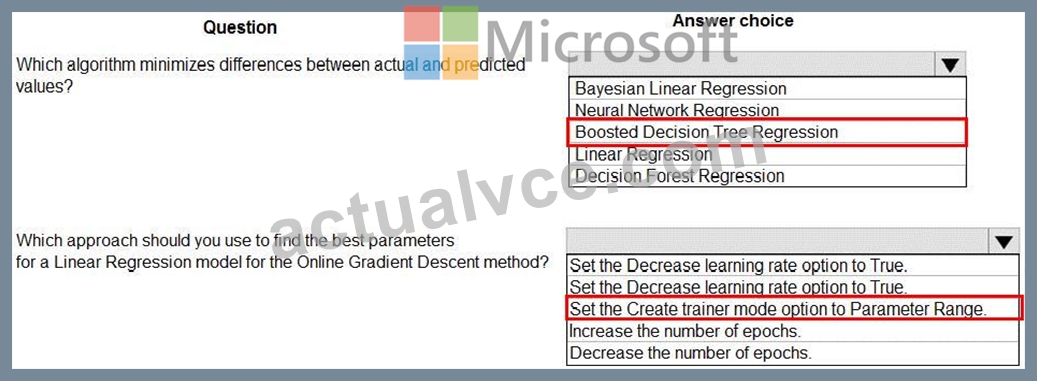
Explanation:
Box 1: Boosted Decision Tree Regression
Mean absolute error (MAE) measures how close the predictions are to the actual outcomes; thus, a lower score is better.
Box 2:
Online Gradient Descent: If you want the algorithm to find the best parameters for you, set Create trainer mode option to Parameter Range. You can then specify multiple values for the algorithm to try.
References:
https://docs.microsoft.com/en-us/azure/machine-learning/studio-module-reference/evaluate-model
https://docs.microsoft.com/en-us/azure/machine-learning/studio-module-reference/linear-regression
NEW QUESTION 20
You are building an intelligent solution using machine learning models.
The environment must support the following requirements:
* Data scientists must build notebooks in a cloud environment
* Data scientists must use automatic feature engineering and model building in machine learning pipelines.
* Notebooks must be deployed to retrain using Spark instances with dynamic worker allocation.
* Notebooks must be exportable to be version controlled locally.
You need to create the environment.
Which four actions should you perform in sequence? To answer, move the appropriate actions from the list of actions to the answer area and arrange them in the correct order.
Answer:
Explanation:
Explanation
Step 1: Create an Azure HDInsight cluster to include the Apache Spark Mlib library Step 2: Install Microsot Machine Learning for Apache Spark You install AzureML on your Azure HDInsight cluster.
Microsoft Machine Learning for Apache Spark (MMLSpark) provides a number of deep learning and data science tools for Apache Spark, including seamless integration of Spark Machine Learning pipelines with Microsoft Cognitive Toolkit (CNTK) and OpenCV, enabling you to quickly create powerful, highly-scalable predictive and analytical models for large image and text datasets.
Step 3: Create and execute the Zeppelin notebooks on the cluster
Step 4: When the cluster is ready, export Zeppelin notebooks to a local environment.
Notebooks must be exportable to be version controlled locally.
References:
https://docs.microsoft.com/en-us/azure/hdinsight/spark/apache-spark-zeppelin-notebook
https://azuremlbuild.blob.core.windows.net/pysparkapi/intro.html
NEW QUESTION 21
You have an Azure Machine Learning workspace that contains a CPU-based compute cluster and an Azure Kubernetes Services (AKS) inference cluster. You create a tabular dataset containing data that you plan to use to create a classification model.
You need to use the Azure Machine Learning designer to create a web service through which client applications can consume the classification model by submitting new data and getting an immediate prediction as a response.
Which three actions should you perform in sequence? To answer, move the appropriate actions from the list of actions to the answer area and arrange them in the correct order.
Answer:
Explanation:
Explanation
Step 1: Create and start a Compute Instance
To train and deploy models using Azure Machine Learning designer, you need compute on which to run the training process, test the model, and host the model in a deployed service.
There are four kinds of compute resource you can create:
Compute Instances: Development workstations that data scientists can use to work with data and models.
Compute Clusters: Scalable clusters of virtual machines for on-demand processing of experiment code.
Inference Clusters: Deployment targets for predictive services that use your trained models.
Attached Compute: Links to existing Azure compute resources, such as Virtual Machines or Azure Databricks clusters.
Step 2: Create and run a training pipeline..
After you've used data transformations to prepare the data, you can use it to train a machine learning model.
Create and run a training pipeline
Step 3: Create and run a real-time inference pipeline
After creating and running a pipeline to train the model, you need a second pipeline that performs the same data transformations for new data, and then uses the trained model to inference (in other words, predict) label values based on its features. This pipeline will form the basis for a predictive service that you can publish for applications to use.
Reference:
https://docs.microsoft.com/en-us/learn/modules/create-classification-model-azure-machine-learning-designer/
NEW QUESTION 22
You run an experiment that uses an AutoMLConfig class to define an automated machine learning task with a maximum of ten model training iterations. The task will attempt to find the best performing model based on a metric named accuracy.
You submit the experiment with the following code:
You need to create Python code that returns the best model that is generated by the automated machine learning task. Which code segment should you use?
A)
B)
C)
D)
- A. Option A
- B. Option D
- C. Option B
- D. Option C
Answer: A
NEW QUESTION 23
You are with a time series dataset in Azure Machine Learning Studio.
You need to split your dataset into training and testing subsets by using the Split Data module.
Which splitting mode should you use?
- A. Regular Expression Split
- B. Relative Expression Split
- C. Split Rows with the Randomized split parameter set to true
- D. Recommender Split
Answer: C
Explanation:
Split Rows: Use this option if you just want to divide the data into two parts. You can specify the percentage of data to put in each split, but by default, the data is divided 50-50.
Incorrect Answers:
B: Regular Expression Split: Choose this option when you want to divide your dataset by testing a single column for a value.
C: Relative Expression Split: Use this option whenever you want to apply a condition to a number column.
References:
https://docs.microsoft.com/en-us/azure/machine-learning/studio-module-reference/split-data
NEW QUESTION 24
A coworker registers a datastore in a Machine Learning services workspace by using the following code:
You need to write code to access the datastore from a notebook.
Answer:
Explanation:
Explanation:
Box 1: DataStore
To get a specific datastore registered in the current workspace, use the get() static method on the Datastore class:
# Get a named datastore from the current workspace
datastore = Datastore.get(ws, datastore_name='your datastore name')
Box 2: ws
Box 3: demo_datastore
Reference:
https://docs.microsoft.com/en-us/azure/machine-learning/how-to-access-data
NEW QUESTION 25
You need to define a process for penalty event detection.
Which three actions should you perform in sequence? To answer, move the appropriate actions from the list of actions to the answer area and arrange them in the correct order.
Answer:
Explanation:
NEW QUESTION 26
You register a file dataset named csv_folder that references a folder. The folder includes multiple comma- separated values (CSV) files in an Azure storage blob container.
You plan to use the following code to run a script that loads data from the file dataset. You create and instantiate the following variables:
You have the following code:
You need to pass the dataset to ensure that the script can read the files it references.
Which code segment should you insert to replace the code comment?
- A. inputs=[file_dataset.as_named_input('training_files').as_mount()],
- B. inputs=[file_dataset.as_named_input('training_files')],
- C. inputs=[file_dataset.as_named_input('training_files').to_pandas_dataframe()],
- D. script_params={'--training_files': file_dataset},
Answer: A
Explanation:
Example:
from azureml.train.estimator import Estimator
script_params = {
# to mount files referenced by mnist dataset
'--data-folder': mnist_file_dataset.as_named_input('mnist_opendataset').as_mount(),
'--regularization': 0.5
}
est = Estimator(source_directory=script_folder,
script_params=script_params,
compute_target=compute_target,
environment_definition=env,
entry_script='train.py')
Reference:
https://docs.microsoft.com/en-us/azure/machine-learning/tutorial-train-models-with-aml
NEW QUESTION 27
You create a multi-class image classification deep learning experiment by using the PyTorch framework. You plan to run the experiment on an Azure Compute cluster that has nodes with GPU's.
You need to define an Azure Machine Learning service pipeline to perform the monthly retraining of the image classification model. The pipeline must run with minimal cost and minimize the time required to train the model.
Which three pipeline steps should you run in sequence? To answer, move the appropriate actions from the list of actions to the answer area and arrange them in the correct order.
Answer:
Explanation:
Explanation
Step 1: Configure a DataTransferStep() to fetch new image data...
Step 2: Configure a PythonScriptStep() to run image_resize.y on the cpu-compute compute target.
Step 3: Configure the EstimatorStep() to run training script on the gpu_compute computer target.
The PyTorch estimator provides a simple way of launching a PyTorch training job on a compute target.
Reference:
https://docs.microsoft.com/en-us/azure/machine-learning/how-to-train-pytorch
NEW QUESTION 28
You use Data Science Virtual Machines (DSVMs) for Windows and Linux in Azure.
You need to access the DSVMs.
Which utilities should you use? To answer, select the appropriate options in the answer area.
NOTE: Each correct selection is worth one point.
Answer:
Explanation:
NEW QUESTION 29
You need to implement a new cost factor scenario for the ad response models as illustrated in the performance curve exhibit.
Which technique should you use?
- A. Set the threshold to 0.05 and retrain if weighted Kappa deviates +/- 5% from 0.5.
- B. Set the threshold to 0.5 and retrain if weighted Kappa deviates +/- 5% from 0.45.
- C. Set the threshold to 0.2 and retrain if weighted Kappa deviates +/- 5% from 0.6.
- D. Set the threshold to 0.75 and retrain if weighted Kappa deviates +/- 5% from 0.15.
Answer: B
Explanation:
Explanation
Scenario:
Performance curves of current and proposed cost factor scenarios are shown in the following diagram:
The ad propensity model uses a cut threshold is 0.45 and retrains occur if weighted Kappa deviated from 0.1
+/- 5%.
NEW QUESTION 30
You need to define an evaluation strategy for the crowd sentiment models.
Which three actions should you perform in sequence? To answer, move the appropriate actions from the list of actions to the answer area and arrange them in the correct order.
Answer:
Explanation:
1 - Define a cross-entropy function activation.
2 - Add cost functions for each target state.
3 - Evaluate the distance error metric.
NEW QUESTION 31
You are producing a multiple linear regression model in Azure Machine learning Studio.
Several independent variables are highly correlated.
You need to select appropriate methods for conducting elective feature engineering on all the data.
Which three actions should you perform in sequence? To answer, move the appropriate Actions from the list of actions to the answer area and arrange them in the correct order.
Answer:
Explanation:
NEW QUESTION 32
You are retrieving data from a large datastore by using Azure Machine Learning Studio.
You must create a subset of the data for testing purposes using a random sampling seed based on the system clock.
You add the Partition and Sample module to your experiment.
You need to select the properties for the module.
Which values should you select? To answer, select the appropriate options in the answer area.
NOTE: Each correct selection is worth one point.
Answer:
Explanation:
Explanation
Box 1: Sampling
Create a sample of data
This option supports simple random sampling or stratified random sampling. This is useful if you want to create a smaller representative sample dataset for testing.
1. Add the Partition and Sample module to your experiment in Studio, and connect the dataset.
2. Partition or sample mode: Set this to Sampling.
3. Rate of sampling. See box 2 below.
Box 2: 0
3. Rate of sampling. Random seed for sampling: Optionally, type an integer to use as a seed value.
This option is important if you want the rows to be divided the same way every time. The default value is 0, meaning that a starting seed is generated based on the system clock. This can lead to slightly different results each time you run the experiment.
References:
https://docs.microsoft.com/en-us/azure/machine-learning/studio-module-reference/partition-and-sample
NEW QUESTION 33
You need to correct the model fit issue.
Which three actions should you perform in sequence? To answer, move the appropriate actions from the list of actions to the answer area and arrange them in the correct order.
Answer:
Explanation:
Explanation
Step 1: Augment the data
Scenario: Columns in each dataset contain missing and null values. The datasets also contain many outliers.
Step 2: Add the Bayesian Linear Regression module.
Scenario: You produce a regression model to predict property prices by using the Linear Regression and Bayesian Linear Regression modules.
Step 3: Configure the regularization weight.
Regularization typically is used to avoid overfitting. For example, in L2 regularization weight, type the value to use as the weight for L2 regularization. We recommend that you use a non-zero value to avoid overfitting.
Scenario:
Model fit: The model shows signs of overfitting. You need to produce a more refined regression model that reduces the overfitting.
NEW QUESTION 34
You are working on a classification task. You have a dataset indicating whether a student would like to play soccer and associated attributes. The dataset includes the following columns:
You need to classify variables by type.
Which variable should you add to each category? To answer, select the appropriate options in the answer area.
NOTE: Each correct selection is worth one point.
Answer:
Explanation:
Explanation:
References:
https://www.edureka.co/blog/classification-algorithms/
NEW QUESTION 35
......
Pass Microsoft DP-100 Exam – Experts Are Here To Help You: https://www.actualvce.com/Microsoft/DP-100-valid-vce-dumps.html
Get Latest Microsoft Azure DP-100 Practice Test For Quick Preparation: https://drive.google.com/open?id=1MvrK_9LOqxYRfBtJ4VLYhI3nhAc-oEfR